EDSim
EDSim: An Agentic Simulator for Emergency Department Operations







📖 Full API documentation 🎬 Demo video
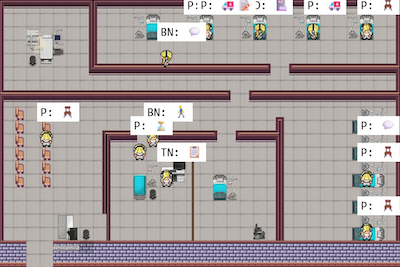
EDSim is a multi-agent simulation of emergency department (ED) workflows driven by large language model (LLM)-powered autonomous agents. Each agent — doctor, bedside nurse, triage nurse, or patient — perceives its environment, makes decisions through cognitive modules, holds natural-language conversations with other agents, and executes clinically-constrained behaviors in real time. The result is a high-fidelity testbed for ED operations research that goes beyond what traditional simulation methods can produce.
Background & Motivation
Emergency departments face chronic crowding and complex patient-flow challenges that are difficult to study safely in real clinical settings. Traditional simulation approaches — discrete-event models and rule-based agent simulations — can reproduce coarse statistics like average wait times and throughput, but they cannot capture the fine-grained staff behaviors, spontaneous communication, and dynamic decision-making that ultimately shape patient outcomes.
EDSim addresses this gap by grounding each virtual agent in an LLM-driven cognitive architecture. Agents form memories, reflect on past events, plan upcoming actions, and converse with one another — all while operating under clinically realistic constraints such as CTAS triage protocols and role-specific responsibilities. This combination enables the simulator to surface emergent workflow patterns that simpler models miss.
The immediate practical value is speed and safety: hospital managers and researchers can run what-if experiments — reallocating beds, adjusting staffing levels, changing triage thresholds — in minutes on commodity hardware, without disrupting real patient care.
Key Findings & Validation
EDSim has been validated against real-world ED operational data (details in the preprint):
- Realistic wait-time distributions — Baseline simulation results align with historical patient wait-time distributions when stratified by CTAS triage acuity level (1–5).
- Authentic agent behavior — Agents generate convincing clinical conversations and exhibit plausible adaptive behaviors under novel workflow conditions not seen during prompt design.
- Rapid experimentation — Operational interventions (e.g., bed reallocation, surge staffing) can be evaluated end-to-end in minutes, enabling iterative hypothesis testing.
EDSim represents a new paradigm for healthcare operations research — combining data-driven modeling with LLM-generated behavior to produce a simulator that is both statistically grounded and behaviorally rich.
Table of Contents
- Background & Motivation
- Key Findings & Validation
- Quickstart
- Architecture Overview
- Agent Roles
- Installation
- Running the Simulation
- Configuration
- Data Collection
- Testing
- CI/CD
- Acknowledgments
- Citation
- License
Quickstart
Get EDSim running in three steps using Docker (no conda or Python setup required):
# 1. Clone the repository
git clone <repo-url> EDSim && cd EDSim

# 2. Add your API credentials
cp .env.example .env   # then edit .env with your OPENAI_KEY, OPENAI_MODEL, etc.

# 3. Start the simulation
docker compose up --build
Open http://localhost:8000/ to confirm the frontend is running. The backend runs headlessly and writes simulation state to a shared volume.
For interactive mode, custom configuration, or local development, see the sections below.
Phase 1 Floor Plan Viewer
A new React + Three.js 3D renderer is being built under
environment/react_frontend/ (tracking
Issue #15). To preview just
the floor plan layout from a Tiled map without running the simulation:
./run_map_viewer.sh # opens http://127.0.0.1:5173
See environment/react_frontend/README.md
for the parser architecture, validation criteria, and how to add a new map.
Architecture Overview
EDSim consists of three main components:
Backend Simulation Engine (reverie/)
The core engine that drives agent behavior. Each agent is equipped with cognitive modules that form the simulation’s cognitive loop:
- Plan — generates and revises daily and immediate action plans
- Perceive — observes nearby agents, objects, and events in the ED environment
- Reflect — synthesizes observations into higher-level insights stored in memory
- Converse — initiates and participates in natural-language conversations with other agents
- Execute — translates planned actions into simulation state changes (movement, tests, discharge)
Agent personas, memory streams, and spatial awareness are managed within the persona/ sub-package.
Frontend Visualization Server (environment/)
A Django-based web application that renders the ED floor plan and provides a browser-based interface for replaying and inspecting simulation runs. Agents and patients are visualized on a tile-based map that reflects the physical layout of the ED.
Analysis Pipeline (analysis/)
Post-simulation scripts that compute operational metrics from the simulation output, including patient throughput, time-in-state distributions, and CTAS-stratified performance summaries.
Agent Roles
- Doctor — Assesses patients, orders diagnostic tests, and discharges patients. Spawns in the major injuries zone.
- Bedside Nurse — Transfers patients between rooms and performs tests. Spawns in the minor injuries zone.
- Triage Nurse — Assigns a CTAS score and injury zone to incoming patients. Spawns in the triage zone.
- Patient — Arrives with symptoms, interacts with staff, and follows the simulation flow. Spawns at the ED entrance.
Installation
Prerequisites
Local (Conda) Setup
git clone <repo-url> EDSim
cd EDSim
conda create --name simulacra python=3.9.12
conda activate simulacra
pip install -r requirements.txt
API Credentials
EDSim supports two credential methods; the first one found is used.
Method 1 — .env file (for Docker or any environment):
cp .env.example .env
# Edit .env and fill in OPENAI_KEY, OPENAI_MODEL, EMBEDDINGS_KEY, etc.
Method 2 — openai_config.json (for local/conda runs):
Create openai_config.json in the repository root (gitignored). Supports both OpenAI and Azure OpenAI:
OpenAI:
{
  "client": "openai",
  "model": "gpt-3.5-turbo",
  "model-key": "sk-...",
  "embeddings-client": "openai",
  "embeddings-model": "text-embedding-ada-002",
  "embeddings-key": "sk-..."
}
Azure OpenAI:
{
  "client": "azure",
  "model": "gpt-35-turbo-0125",
  "model-key": "your-azure-key",
  "model-endpoint": "https://your-resource.openai.azure.com/",
  "model-api-version": "2024-02-01",
  "embeddings-client": "azure",
  "embeddings-model": "text-embedding-ada-002",
  "embeddings-key": "your-azure-embeddings-key",
  "embeddings-endpoint": "https://your-resource.openai.azure.com/",
  "embeddings-api-version": "2024-02-01"
}
Running the Simulation
Interactive Mode (Frontend + Backend)
This mode lets you watch the simulation in real time through a browser-based visualization. Requires the local conda setup.
Terminal 1 — Frontend:
cd environment/frontend_server
python manage.py runserver 8000
Open http://localhost:8000/ in your browser.
Terminal 2 — Backend:
conda activate simulacra
cd reverie/backend_server
python reverie.py
At the interactive prompt: type run <steps> to advance (e.g., run 1000), and fin to save and exit. The virtual map is at http://localhost:8000/simulator_home.
reverie.py arguments:
| Argument | Description | Default |
|---|---|---|
--origin |
Source folder from which the simulation is initialized. | ed_sim_n5 |
--target |
Folder where the simulation output is saved. | test-simulation |
--browser |
Automatically open a Firefox browser tab (yes or no). |
yes |
--headless |
Run in headless mode, skipping frontend file I/O for faster runs (yes or no). |
no |
--write_movement |
Write movement/{step}.json each step for replay (yes or no). |
yes |
Batch / Headless Mode (run_simulation.py)
For long unattended runs (e.g., 48 simulated hours). No frontend server is needed.
# Prepare the seed
cp -r environment/frontend_server/storage/ed_sim_n5 environment/frontend_server/storage/curr_sim

conda activate simulacra
cd reverie/backend_server
python run_simulation.py
The script runs in chunks, saves progress after each chunk, and retries failed chunks with exponential backoff (1 min → 2 min → 5 min). Errors are logged to error_log_run_simulation_safe-mode.txt.
Configurable variables (top of run_simulation.py):
| Variable | Description | Default |
|---|---|---|
hours_to_run |
Simulated hours to run. | 48 |
steps_per_save |
Steps per chunk before saving. | 1000 |
write_movement |
Write movement files each step. Disable for faster runs. | True |
Troubleshooting
- OpenAI library version —
pip install --upgrade openai cost_logger.pyJSON error — Inopenai_cost_logger.py(site-packages), change the time format fromxx:xx:xxtoxx-xx-xx.
Configuration
meta.json
Adjust simulation parameters by editing <origin_folder>/reverie/meta.json:
| Key | Description |
|---|---|
start_date |
Date the simulation starts. |
curr_time |
Start datetime of the simulation. |
sec_per_step |
Seconds of simulation time per step. |
maze_name |
Name of the map layout used. |
persona_names |
List of personas available at simulation start. |
{role}_starting_amount |
Number of agents of a given role at start (e.g., doctor_starting_amount). |
patient_rate_modifier |
Adjusts patient arrival rate (e.g., 0.5 = half the default rate). |
priority_factor |
Factor for prioritizing patients by CTAS score. |
testing_time |
Duration of diagnostic tests (minutes). |
testing_result_time |
Time for diagnostic results to return (minutes). |
patient_walkout_probability |
Probability (0–1) that a waiting patient leaves the ED. |
patient_walkout_check_minutes |
Minutes between walk-out evaluations for a patient in the same state. |
patient_post_discharge_linger_probability |
Probability (0–1) that a discharged patient remains in their bed space. |
patient_post_discharge_linger_minutes |
Minutes a lingering patient stays before heading to the exit (0 = indefinitely). |
Walk-out and post-discharge lingering events are logged per patient in data_collection.json under left_department_by_choice and lingered_after_discharge.
maze_status.json
| Field | Description |
|---|---|
change_bed_amount |
Areas that will have their bed counts changed in the next simulation. |
remove_beds |
Number of beds to remove from the injuries area. |
Adjusting the Map Layout
Use the Tiled map editor:
- Open the existing map file from
static_dirs/assets/visuals. - Edit the layout, keeping tile conventions for spawn locations, sectors, arenas, and object interaction layers.
- Save to
static_dirs/assets/visuals. - Update
maze_nameinmeta.jsonto match the new filename.
Data Collection
Patient Fields
| Field | Description |
|---|---|
ICD-10-CA_code |
Diagnosis assigned at patient creation. |
CTAS_score |
Score assigned by the Triage Nurse (0 = unassigned). |
Injuries_zone |
Zone assigned by the Triage Nurse. |
Time_spent_state |
Time spent in each state (minutes). |
Time_spent_area |
Time spent in each area (minutes). |
Exempt_from_data_collection |
Whether the patient is excluded from final data (e.g., added via unseen actions). |
Summarized by CTAS Score
| Field | Description |
|---|---|
Num_of_patients |
Total patients with this score. |
Percentage_of_total |
Percentage of all patients with this score. |
Total |
Total time spent (all patients) in states and areas. |
Normalized |
Average time per patient in states and areas. |
Standard Deviation |
Standard deviation for time in states and areas. |
Minor injuries zone / Major injuries zone / Trauma room |
Counts of patients in each zone or room. |
Patient times and CTAS scores are also exported as CSV files by the analysis pipeline.
Testing
The project ships with a pytest-based unit test suite covering the backend simulation utilities, analysis pipeline, and Django frontend views.
Local (conda):
# Backend + analysis
python -m pytest tests/backend/ tests/analysis/ -v -p no:django

# Frontend (Django views)
python -m pytest tests/frontend/ -v
Inside the Docker container:
docker compose run --rm backend python -m pytest /app/tests/backend/ /app/tests/analysis/ -v -p no:django
CI/CD
Every pull request and push to main triggers the GitHub Actions CI pipeline. Docker images are published to the GitHub Container Registry on merge.
| Workflow | Trigger | What it does |
|---|---|---|
| CI | PR / push to main |
Runs backend, analysis, and frontend tests |
| Docker | Push to main |
Builds and pushes images to GHCR |
| Release | Push a v* tag |
Creates a GitHub Release with auto-generated notes |
To cut a release:
git tag v1.0.0 && git push origin v1.0.0
Acknowledgments
We thank the clinical staff and operational teams who contributed domain expertise to the design of EDSim’s agent behaviors and workflows.
Citation
If you use EDSim in your research, please cite:
@misc{wu2026edsim,
  title     = {EDSim: An Agentic Simulator for Emergency Department Operations},
  author    = {Wu, Jiajun and Ledingham, Hutton and Wang, Zirui and Teitge, Braden
               and Burn, Alexander and Ouadihi, Oussama and Ghattas, Mohamad
               and Vicaldo, Darin and Cociuba, Sergiu and Harmon, Megan
               and Chowdhury, Tanvir and Marshall, Zack and Williamson, Tyler
               and Risling, Tracie and Lang, Eddy and Zhou, Jiayu
               and Holodinsky, Jessalyn and Drew, Steve},
  year      = {2026},
  doi       = {10.21203/rs.3.rs-8960989/v1},
  note      = {Preprint, under review at \textit{npj Digital Medicine}},
  publisher = {Research Square}
}
License
This project is released under the Apache License 2.0.